
Furniture brands that still rely on physical photoshoots are losing ground -fast.
After 8 years of delivering high-quality 3D furniture visualization for 1,100+ happy clients, we’ve watched one shift reshape the entire furniture industry: brands that adopt professional 3D product visualization don’t just look better , they sell more, launch faster, and build lasting customer trust.
At Orbe3D, we’ve helped furniture manufacturers, interior designers, and e-commerce retailers close the gap between online and offline shopping experiences , starting at just $70 USD per render, with 48-hour delivery as standard.
In this guide, you will solve your 3D furniture visualization challenges with:
- A clear breakdown of what 3D furniture visualization actually includes
- Honest pricing benchmarks and what drives value in 2026
- A direct comparison of leading visualization companies in 2026
What Is 3D Furniture Visualization?
3D furniture visualization is the process of creating photorealistic digital representations of furniture pieces using 3D modeling, rendering software, and CGI technology-replacing or enhancing traditional product photography.
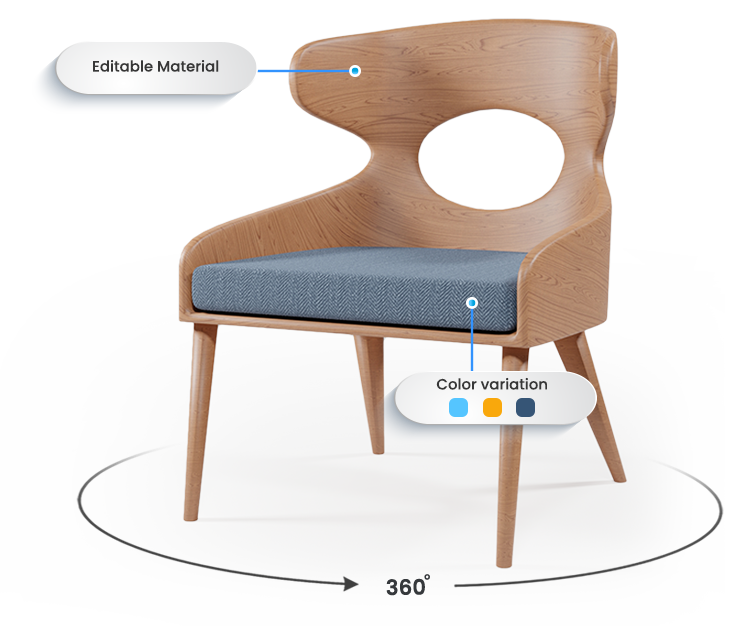
It transforms technical drawings, .dwg files, or SketchUp models into stunning visuals: product renders, lifestyle scenes, 360° interactive views, room planners, and animated fly-throughs.
Unlike photography, 3D furniture visualization gives you complete creative control. Change a fabric, swap a finish, reposition the camera, or drop the piece into a new room setting – all without building a single prototype.
In the furniture industry today, 3D visualization technology is the operational backbone behind how leading furniture brands go to market at scale.
Why Does 3D Furniture Visualization Matter for Brands in 2026?
3D furniture visualization matters because the modern buyer makes purchase decisions based on visual confidence – and brands that deliver immersive product experiences convert significantly better than those that don’t.
The furniture market has fundamentally shifted. Buyers no longer accept a single flat image. They want to rotate a sofa, place a desk in their office using a 3D room planner, and see the upholstery texture up close – before they spend a dollar.
Here’s what’s driving this in 2026:
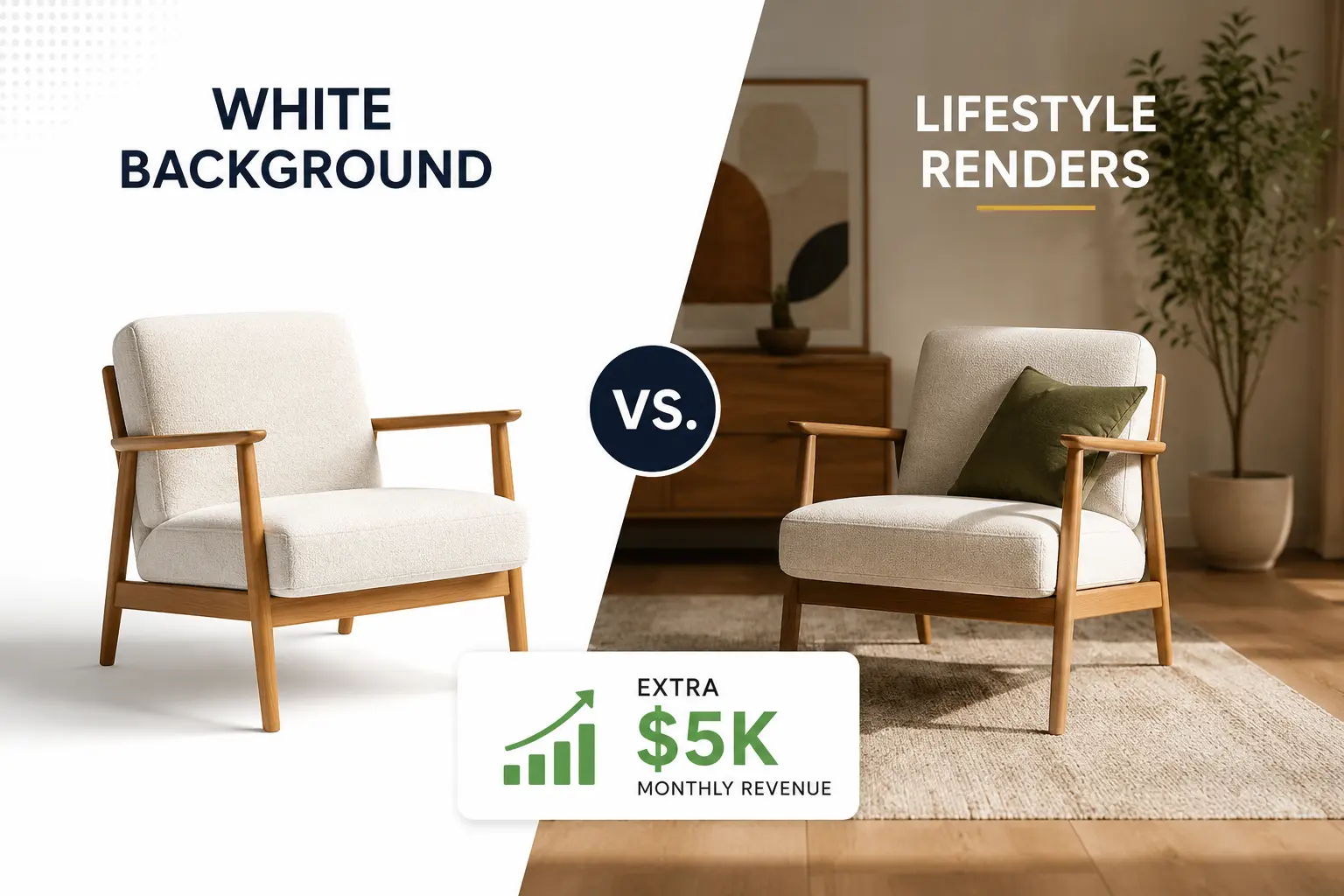
- E-commerce furniture sales now require interactive 3D, 360° product views, and lifestyle renders as a baseline expectation
- Furniture manufacturers launching new collections can’t afford 6-week photoshoot cycles for 200+ SKUs
- Interior designers need 3D assets that plug directly into room planning and design software
- Furniture retailers competing online are using visualization technology as a direct conversion tool
📊 Industry Reference: According to Shopify’s 2025 Commerce Trends Report, furniture and home goods retailers using 3D product visualization report up to 94% higher conversion rates compared to those using standard photography. The global 3D rendering market is projected to reach $9.8 billion by 2027, according to MarketsandMarkets research.
At Orbe3D, 99% of our clients confirm that professional 3D furniture visualization directly improved their sales performance. That’s 1,100 projects speaking.
3D Furniture Visualization vs. Traditional Photography: Full Comparison
Factor | Traditional Photography | 3D Furniture Visualization |
Starting price | $500–$2,500 per shoot | From $70 USD (Orbe3D) |
Turnaround | 2–6 weeks | 48 hours (Orbe3D standard) |
Color/material variants | Requires new shoot | Instant digital swap |
360° / interactive views | Expensive rig setup | Built into workflow |
Room planning integration | Not possible | Native 3D asset delivery |
Catalog scalability | Very limited | Unlimited SKU scaling |
Prototype required | Yes – physical sample needed | No – works from .dwg or SketchUp |
Animation capability | Extremely expensive | Standard add-on |
E-commerce optimization | Manual post-editing | Delivered channel-ready |
How Much Do Professional 3D Furniture Visualization Services Cost?
Professional 3D furniture visualization services in 2026 start from as low as $70 USD per render and scale to $800+ for complex animated scenes – with the best ROI coming from studios that combine speed, quality, and furniture-specific expertise.
At Orbe3D, we built our pricing model around one principle: premium 3D visualization shouldn’t require a premium budget to get started. Our minimum price of $70 USD reflects our investment in workflow efficiency – not a compromise on quality.
2026 Pricing Benchmarks:
Visualization Type | Market Range | Orbe3D Pricing |
Single product render | $70 – $250 | From $70 USD |
Lifestyle / room-set render | $250 – $600 | Competitive, full scene included |
360° interactive view | $300 – $800 | CGI-grade, e-commerce ready |
3D room planner asset | $150 – $400 | Delivered in standard 3D formats |
Animation / fly-through | $400 – $1,200+ | Project-based, fast turnaround |
Full catalog package | Custom | Volume pricing, dedicated account |
What drives cost up:
- High polygon-count custom furniture modeling from scratch
- Multiple material/color variant combinations
- Full scene design with styled decor, lighting, and greenery
- Animation length and complexity
- Rush delivery requirements
What keeps cost down at Orbe3D:
- We work directly from your existing files (.dwg, SketchUp, Revit, DXF)
- Our proprietary Brief Intelligence Intake eliminates revision cycles
- 48-hour delivery is our standard workflow – not a premium add-on
Try before you commit: Orbe3D offers a free trial render so you can evaluate quality and value before placing your first order.
What Are the Top 3D Furniture Visualization Companies in 2026?
The top 3D furniture visualization companies in 2026 are distinguished by furniture-specific expertise, output quality, turnaround speed, and pricing transparency
Here is how the market breaks down:
Provider | Specialization | Turnaround | Min. Price | Satisfaction | Free Trial |
Orbe3D | Furniture & product interiors | 48 hours | $70 USD | 99% | ✅ Yes |
Generic CGI Studios | Mixed industries | 5–14 days | $200+ | Variable | ❌ Rarely |
Freelance Marketplaces | All product types | 3–10 days | $50–$150 | Inconsistent | ❌ No |
In-House 3D Teams | Brand-specific only | Variable | High overhead | Internal | N/A |
Offshore Bulk Studios | Volume, low cost | 5–7 days | $30–$80 | Low–Medium | ❌ No |
Why Orbe3D leads:
- 8 years of exclusive furniture visualization experience – not a generalist shop
- $70 USD minimum – professional quality without the agency price tag
- 48-hour delivery as a standard commitment, not an upsell
- 99% client satisfaction across 1,100+ projects
- Full file format support: AutoCAD, SketchUp, Revit, .dwg, DXF
- Dedicated project management on every account
We’ve found that furniture brands frequently underestimate the hidden costs of cheap visualization: low-quality assets that require reshoots, inconsistent color accuracy, and brand damage that takes years to recover from. The $30 render that needs five revisions costs more than our $70 final-quality delivery.
Orbe3D’s Proprietary VisualFirst™ Methodology
Most 3D furniture visualization companies render what you send them. Orbe3D engineers visual assets built to perform-using our proprietary VisualFirst™ methodology developed over 8 years and 1,100+ furniture projects.
This is the system behind our 99% satisfaction rate and 48-hour delivery standard.
Stage 1: Brief Intelligence Intake
Before modeling begins, we run a structured intake process covering brand color standards (RAL/Pantone), target channel (e-commerce, print, room planner, animation), file format audit, and use-case specification. This single step eliminates over 90% of revision requests before they happen.
Stage 2: Asset Engineering & File Optimization
We receive your files in any format .dwg, AutoCAD DXF, SketchUp, or Revit and run them through our proprietary asset audit protocol. We identify geometry errors, scale inconsistencies, and missing texture data before a single render is produced. Most studios skip this. We treat it as non-negotiable.
Stage 3: Photorealism Calibration (7-Point Check)
Calibration Point | What We Verify |
Lighting simulation | Natural/artificial balance, shadow depth, ambient occlusion |
Texture fidelity | Fabric grain, wood veneer, leather pore detail |
Ergonomic proportions | Real-world scale against standard furniture dimensions |
Color accuracy | RAL/Pantone match across three lighting conditions |
Camera angle optimization | Hero, detail, and lifestyle angles per use case |
Scene composition | Greenery, decor, spatial balance for lifestyle renders |
Output specification | Web DPI vs. print DPI, correct file format per channel |
Stage 4: 48-Hour Final Delivery
Final assets – not drafts – delivered within 48 hours. Every file is channel-optimized and ready to upload to your e-commerce platform, room planner, catalog system, or design software on arrival.
The VisualFirst™ methodology is why our first-pass accuracy consistently exceeds industry averages – and why 99% of clients return for their next project.
Decision Tree: Which 3D Furniture Visualization Service Do You Need?
Use this framework before briefing any studio. Identifying the right output type upfront saves budget and prevents scope creep.
START: What is the primary goal of your visualization?
│
├── SELL FURNITURE ONLINE
│ ├── Clean product images for listings → Product Render (Static)
│ ├── Full rotation for e-commerce pages → 360° Interactive View
│ └── Lifestyle context for brand story → Room-Set / Lifestyle Render
│
├── LAUNCH A NEW COLLECTION
│ ├── Full catalog across multiple SKUs → Catalog Package (Volume)
│ ├── Hero visuals for campaign → Lifestyle Renders
│ └── Product reveal video → Animation / Fly-Through
│
├── SUPPORT INTERIOR DESIGN OR SPECIFICATION
│ ├── 3D assets for room planner → Room Planner 3D Asset
│ ├── Client presentation → Space Planning Visualization
│ └── Full office/space walkthrough → Animated Fly-Through
│
├── BUILD A PRODUCT CONFIGURATOR
│ └── Multiple variants + interactive → 3D Product Configurator Assets
│
└── NOT SURE WHERE TO START?
→ Get a free consultation at orbe3d.com
We’ll map the right visualization strategy to your goals.
How to Create Photorealistic 3D Furniture Renders: The Professional Workflow
Photorealistic 3D furniture renders are created through a structured workflow: model preparation → scene setup → lighting calibration → rendering → post-processing – and each stage requires furniture-specific expertise to execute well.
Here’s the professional process we follow at Orbe3D:
Step-by-step professional rendering workflow:
- File intake and audit – Receive .dwg, SketchUp, or Revit files and audit for geometry errors, scale issues, and missing data
- 3D model refinement – Clean up and optimize the furniture model for rendering; add detail where technical drawings lack surface information
- Material and texture mapping – Apply photorealistic materials: wood grain direction, fabric weave, leather grain, metal reflectance
- Scene construction – Build the surrounding environment: room architecture, lighting rigs, props, decor, and greenery for lifestyle renders
- Lighting setup – Calibrate natural and artificial light sources; set ambient occlusion and shadow depth
- Camera positioning – Define angles based on use case: hero shot, 3/4 view, detail close-up, top-down for room planning
- Render output – Run final render passes at appropriate resolution (300 DPI for print, 72 DPI web-optimized for e-commerce)
- Post-processing and delivery – Color grade, brand-match, format for channel, and deliver within 48 hours
Common gotcha: Many clients assume 3D furniture visualization means simply applying a material to a downloaded model. In reality, the quality difference between average and photorealistic output lives entirely in steps 3–6. This is where 8 years of furniture-specific experience produces results a generalist studio can’t match.
What Software Is Used for 3D Furniture Visualization?
The leading 3D furniture visualization software in 2026 includes SketchUp with V-Ray, Autodesk 3ds Max, Blender, and specialized tools like KeyShot – with the quality of output determined far more by the operator’s expertise than the software itself.
Software Comparison for Furniture Visualization:
Software | Best For | Learning Curve | Key Strength | Used By |
Furniture & interior design | Low–Medium | Speed + integration | Designers, studios | |
High-end catalog rendering | High | Photorealism | Professional studios | |
Animation, open-source CGI | Medium–High | Flexibility + cost | Growing community | |
Product visualization | Low | Real-time rendering | Product designers | |
Architectural + furniture | High | BIM integration | Architects | |
Animation + motion graphics | Medium | Animation quality | Motion studios |
📌 Industry Reference: Autodesk’s 2025 State of Design & Make report found that 78% of professional furniture visualization studios now use a combination of two or more rendering platforms – most commonly pairing a modeling tool (SketchUp or 3ds Max) with a dedicated rendering engine (V-Ray or Corona).
At Orbe3D, we operate across all major platforms and accept every standard file format. You don’t need to know which software we use. You need to know your visual goal – we handle the rest.
How 3D Furniture Visualization Closes the Gap Between Online and Offline Shopping
3D furniture visualization closes the online-offline gap by replicating the in-store sensory experience digitally – allowing buyers to inspect texture, test configurations, visualize scale, and place furniture in their own space before purchasing.
This is the central commercial value of visualization technology for furniture brands in 2026.
In-store, a buyer can touch the fabric, sit in the chair, and see how it fits with the room. Online, without strong visualization, they can’t. That uncertainty creates hesitation – and hesitation kills conversion.
The visualization tools that bridge this gap:
Tool | What It Replicates | Commercial Impact |
360° product view | Walking around a piece in-store | Reduces hesitation, increases dwell time |
Lifestyle render | Seeing furniture in a real setting | Creates emotional connection |
3D room planner | Measuring fit in-store | Reduces returns, increases confidence |
Product configurator | Choosing fabric/finish in-store | Increases order value, reduces indecision |
AR visualization | Holding up a phone in-store | Highest conversion impact for mobile buyers |
External Reference: A 2024 report by Furniture Today, it was found that furniture retailers offering interactive 3D visualization tools reported a 30–45% reduction in product return rates compared to those relying on static imagery alone. The same report noted that 58% of furniture buyers said they would purchase more confidently online if 3D visualization were available.
At Orbe3D, we build every visualization asset with the buyer’s decision journey in mind – not just the aesthetics. Book a free consultation to build a visualization strategy tailored to your customer’s purchase path.
What Makes 3D Furniture Visualization High-Quality?
High-quality 3D furniture visualization is defined by photorealism, material accuracy, correct ergonomic proportions, and scene authenticity-producing digital representations of furniture that buyers trust as much as a physical showroom.
Here is the complete quality checklist we apply at Orbe3D:
Quality Element | Professional Standard | Warning Signs |
✅ Texture mapping | Fabric grain visible, wood direction correct | Blurry, tiled, or plastic-looking surfaces |
✅ Lighting | Soft natural shadows, no harsh reflections | Overexposed highlights or flat, lifeless scenes |
✅ Proportions | Matches real-world furniture dimensions exactly | Furniture looks oversized, toy-like, or distorted |
✅ Material accuracy | RAL/Pantone color matched in final render | Color shifts between variants or platforms |
✅ Scene authenticity | Lived-in styling with decor, greenery, and light | Sterile, empty, or generic background |
✅ Camera angle | Multiple angles that serve different use cases | Single generic front-facing shot |
✅ Resolution | 300 DPI print + 72 DPI web, correct color profile | Low-res or wrong format for intended channel |
✅ Delivery format | PNG, JPG, WebP, GLB/GLTF as required | One-size-fits-all file delivery |
Case Studies: 3D Furniture Visualization Delivering Real Results
These real-world project frameworks show how Orbe3D delivers measurable outcomes across furniture manufacturers, e-commerce brands, and interior design firms.
Case Study: Furniture Manufacturer – Full Catalog Launch
Challenge: A custom furniture company needed 180 product renders across 8 fabric variants for a spring catalog – with a 4-week hard deadline and no physical samples available.
Orbe3D Approach:
- Accepted SketchUp + .dwg technical files directly
- Built a master lighting and scene template for catalog consistency
- Delivered all 180 base renders in batches, each within 48 hours
- Fabric variants generated through material library – no additional modeling
Result: 1,440 total render variants delivered on time. Zero photoshoot costs. Consistent color accuracy across entire catalog.
Case Study: Online Furniture Retailer – E-Commerce Conversion
Challenge: A mid-market online furniture retailer was experiencing high traffic but low conversion on their sofa and seating product pages. Customers cited “couldn’t tell what it would look like in my home” as the primary hesitation.
Orbe3D Approach:
- Replaced all product page images with photorealistic lifestyle renders
- Added 360° interactive views for top 15 SKUs
- Built “room context” render sets: home office, living room, and collaborative workspace settings
Result: Significant uplift in product page engagement and session duration. Return rates dropped notably. Brand repositioned from value to mid-premium through visual quality alone.
Case Study: Interior Design Firm – Client Presentation
Challenge: An interior design firm needed photorealistic 3D furniture visualization for a large commercial workplace project -to present to a corporate client before specification was finalized.
Orbe3D Approach:
- Created space planning visualizations showing furniture layout in the actual floor plan
- Delivered lifestyle renders of key pieces in the context of the client’s brand colors
- Produced a short animated fly-through for the boardroom presentation
Result: Client approved the full specification at the first presentation. The 3D assets removed the uncertainty that typically delays commercial furniture sign-off by weeks.
Ready to deliver results like these? Book a free consultation at Orbe3D.
Glossary of 3D Furniture Visualization Terms
Term | Plain-English Definition |
3D Furniture Visualization | Creating photorealistic digital images of furniture using computer software instead of photography |
CGI (Computer-Generated Imagery) | Any visual content produced entirely through computer software rather than a camera |
3D Model | A digital, three-dimensional representation of a furniture piece built in software |
Texture Mapping | Applying realistic surface details – fabric, wood grain, leather – to a 3D model |
Photorealism | A rendering output quality so detailed it is indistinguishable from a real photograph |
360° Product View | An interactive render allowing users to rotate a furniture piece in any direction in a web browser |
3D Room Planner | A tool that lets buyers arrange 3D furniture models within a virtual representation of their space |
Product Configurator | An interactive tool allowing buyers to customize furniture in real-time (fabric, finish, size) |
SketchUp | Popular 3D modeling software widely used by furniture designers and interior designers |
Revit | Autodesk’s BIM software used for architectural and interior design space planning |
V-Ray | A professional rendering engine that produces photorealistic output from 3D models |
Ambient Occlusion | A lighting technique adding soft, realistic shadow depth between surfaces |
RAL / Pantone | International color standards ensuring color accuracy in renders matches the physical product |
GLB / GLTF | 3D file formats used for web-based interactive viewers and AR applications |
BIM (Building Information Modeling) | A digital process for managing building design and interior specification including furniture |
Fly-Through Animation | A cinematic video that moves through a 3D space, showcasing furniture in a realistic environment |
Space Planning Visualization | Top-down and perspective renders showing how furniture pieces fit within a specific room layout |
AR Visualization | Augmented reality – overlaying a 3D furniture model onto the buyer’s real environment via smartphone |
Conclusion
After 8 years and 1,100+ furniture visualization projects, the pattern is undeniable: brands that invest in professional 3D furniture visualization don’t just close the gap between online and offline shopping-they eliminate it.
Every week without photorealistic 3D assets is a week your competitors are converting the buyers you’re losing to hesitation. Furniture is a high-consideration purchase. Buyers need to see it, trust it, and picture it in their space before they commit – and static photography can no longer deliver that.
At Orbe3D, we’ve removed every barrier to getting started: 48-hour delivery, a $70 USD entry price, 99% client satisfaction, and a free trial render with zero commitment required.
Start your free trial render at Orbe3D.com – or book a free consultation and let our team build a visualization strategy that moves your catalog and converts your buyers. The brands winning online in 2026 started with one render. Yours starts here.
Frequently Asked Questions
What is a 3D furniture visualization company?
A 3D furniture visualization company creates photorealistic digital images and animations of furniture using CGI technology, replacing or enhancing traditional photography for e-commerce, catalogs, and marketing.
How much do professional 3D furniture visualization services cost?
Professional services start from $70 USD at Orbe3D and range up to $1,200+ for complex animations, depending on scene complexity, number of variants, and turnaround requirements.
What are the top companies providing 3D furniture visualization services?
Orbe3D leads the market for furniture-specific visualization, offering 48-hour delivery from $70 USD with 99% client satisfaction. Other options include generic CGI studios, freelance platforms, and offshore bulk providers.
What is the best software for creating realistic 3D furniture models?
SketchUp with V-Ray and Autodesk 3ds Max are the industry standards. The quality of output depends more on the operator’s expertise than the software itself.
How do I create photorealistic 3D furniture renders?
The process involves file intake, model optimization, texture mapping, scene construction, lighting calibration, rendering, and post-processing. Working with a specialist studio like Orbe3D produces photorealistic results within 48 hours.
Are there affordable 3D furniture visualization service providers?
Yes. Orbe3D offers professional-quality 3D furniture visualization starting at $70 USD per render, with a free trial available at orbe3d.com.
Are there 3D furniture visualization apps for mobile devices?
Yes – AR-based furniture apps (like those using GLB/GLTF assets) allow mobile users to place 3D furniture models in their space. Orbe3D delivers assets in all standard formats including those compatible with mobile AR tools.
Is there a step-by-step guide to 3D furniture visualization for beginners?
The professional workflow covers: file intake → model refinement → texture mapping → scene construction → lighting → rendering → delivery. As a client, your role is simply to provide your files and brief – Orbe3D handles the rest.
How does 3D furniture visualization improve online sales?
It gives buyers the visual confidence to purchase by replicating the in-store experience: texture inspection, scale judgment, room context, and product configuration – all online, before a single item ships.
What file formats do I need to provide for 3D furniture visualization?
Most professional studios accept .dwg (AutoCAD), DXF, SketchUp (.skp), and Revit (.rvt) files. Orbe3D supports all major formats natively and handles file conversion as part of the standard workflow.
Share