
Traditional office furniture photoshoots are slow, expensive, and completely unable to keep up with 2026’s catalog demands.
After 8 years of delivering photorealistic 3D office furniture rendering for over 1,100 happy clients, we’ve seen one pattern repeat itself: brands that switch to 3D rendering scale faster, cut costs, and convert better – every time.
Managing your office furniture rendering workflow shouldn’t be a guessing game. At Orbe3D, we’ve helped furniture manufacturers, interior designers, and e-commerce sellers reduce visual production costs by up to 60% while delivering assets within 48 hours.
In this guide, you will solve your office furniture visualization challenges with:
- A proven framework for choosing the right 3D rendering service
- Real cost benchmarks and what drives pricing in 2026
- A direct comparison of top service providers – and why Orbe3D leads
What Is Office Furniture Rendering?
Office furniture rendering is the process of creating photorealistic 3D images or animations of office furniture – chairs, desks, workstations, and meeting room seating – using computer-generated imagery (CGI) instead of physical photography.
It uses software like SketchUp, Revit, AutoCAD, and advanced rendering engines to produce high-quality 3D visuals that look indistinguishable from real photographs.
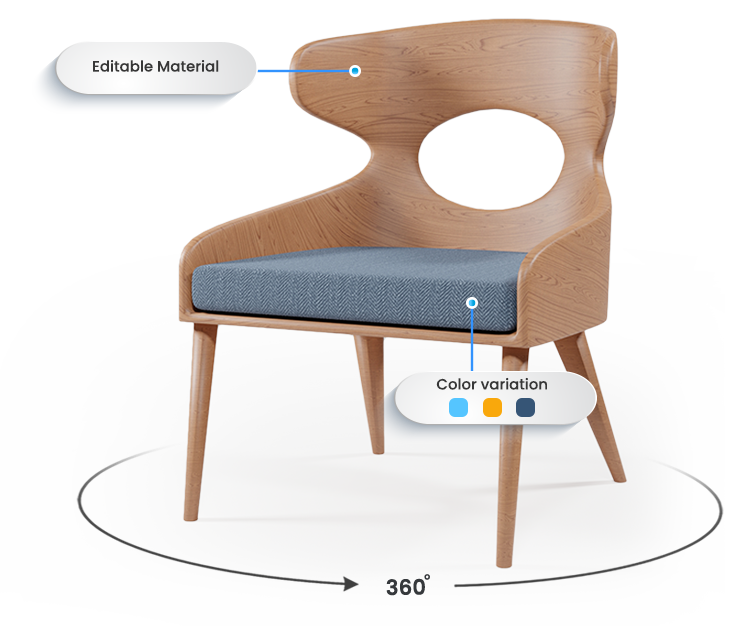
Unlike traditional photoshoots, 3D office furniture rendering allows you to show every angle, color variant, texture, and configuration of a product – without building a single physical prototype.
5 top-rated office furniture rendering service companies (2026)
1. Orbe3D
A specialized 3D furniture visualization studio focused on product and office interior rendering. Known for fast turnaround, scalable catalog production, and high client satisfaction (1,100+ projects). Offers photorealistic renders, 360° views, and AR-ready assets for modern office furniture brands.
2. CGI Furniture
An established studio (since 2011) delivering high-end furniture and office product rendering. Strong in large-scale projects like office catalogs, lifestyle scenes, and animations. Known for consistent quality and enterprise-level support for eCommerce and manufacturers.
3. 7CGI
A cost-effective rendering company specializing in office furniture, interiors, and commercial spaces. Popular among mid-sized brands for affordable pricing, flexible workflow, and reliable communication.
4. OMEGARENDER
A premium visualization studio known for cinematic-quality office and commercial furniture rendering. Works with high-end brands and delivers luxury-level visuals with advanced lighting, textures, and architectural integration.
5. Render Furniture
A dedicated furniture rendering company offering photorealistic office furniture visuals, product renders, and interior scenes. Focuses on fast delivery, cost efficiency, and highly detailed material realism for marketing and product launches.
Quick Insight
- Best for scale: Orbe3D, CGI Furniture
- Best for budget: 7CGI
- Best for premium visuals: OMEGARENDER
- Best for fast production: Render Furniture
Office Furniture Rendering Services Comparison (2026)
Company | Specialization | Turnaround Time | Pricing Level | Key Strength |
Orbe3D | Furniture & product visualization | ~48 hrs | Affordable–Mid | Fast, scalable, high client satisfaction |
CGI Furniture | Furniture CGI & rendering | 5–14 days | Mid–High | Consistent quality for large projects |
7CGI | Furniture & interior rendering | Fast–Medium | Low–Mid | Cost-effective and flexible workflow |
OMEGARENDER | Premium rendering & interiors | Medium | High | Cinematic, ultra-realistic visuals |
Render Furniture | Product & furniture rendering | Fast | Low–Mid | Affordable and quick production |
👉 Read more about best furniture rendering company in 2026
Why Does Office Furniture Rendering Matter in 2026?
Office furniture rendering matters because buyers now expect interactive, photorealistic visuals before they make a purchase – and static 2D images simply no longer convert.
The modern office furniture buyer – whether they’re an interior designer specifying a workplace, or a business owner ordering 50 ergonomic chairs – wants to see the product in context. They want to visualize it in their space, rotate it, configure it, and trust it.
Here’s what’s changed in 2026:
- E-commerce furniture sales require 360° views, lifestyle renders, and room-set visuals as a baseline
- Space planning tools now demand 3D furniture models as standard input
- Brand differentiation is driven by visual quality – luxury renders signal premium products
- Manufacturers launching new collections can’t afford weeks-long photoshoot cycles
📊 Industry Insight: According to Statista’s 2024 e-commerce visual content report, products with 3D or 360° visuals see up to 40% higher engagement rates than those with standard photography. The Furniture Today 2025 Industry Outlook notes that 67% of furniture buyers say visual quality directly influences their purchase decision.
At Orbe3D, 99% of our clients report that switching to 3D furniture rendering directly improved their catalog performance. That’s not a claim – that’s 1,100 projects of evidence.
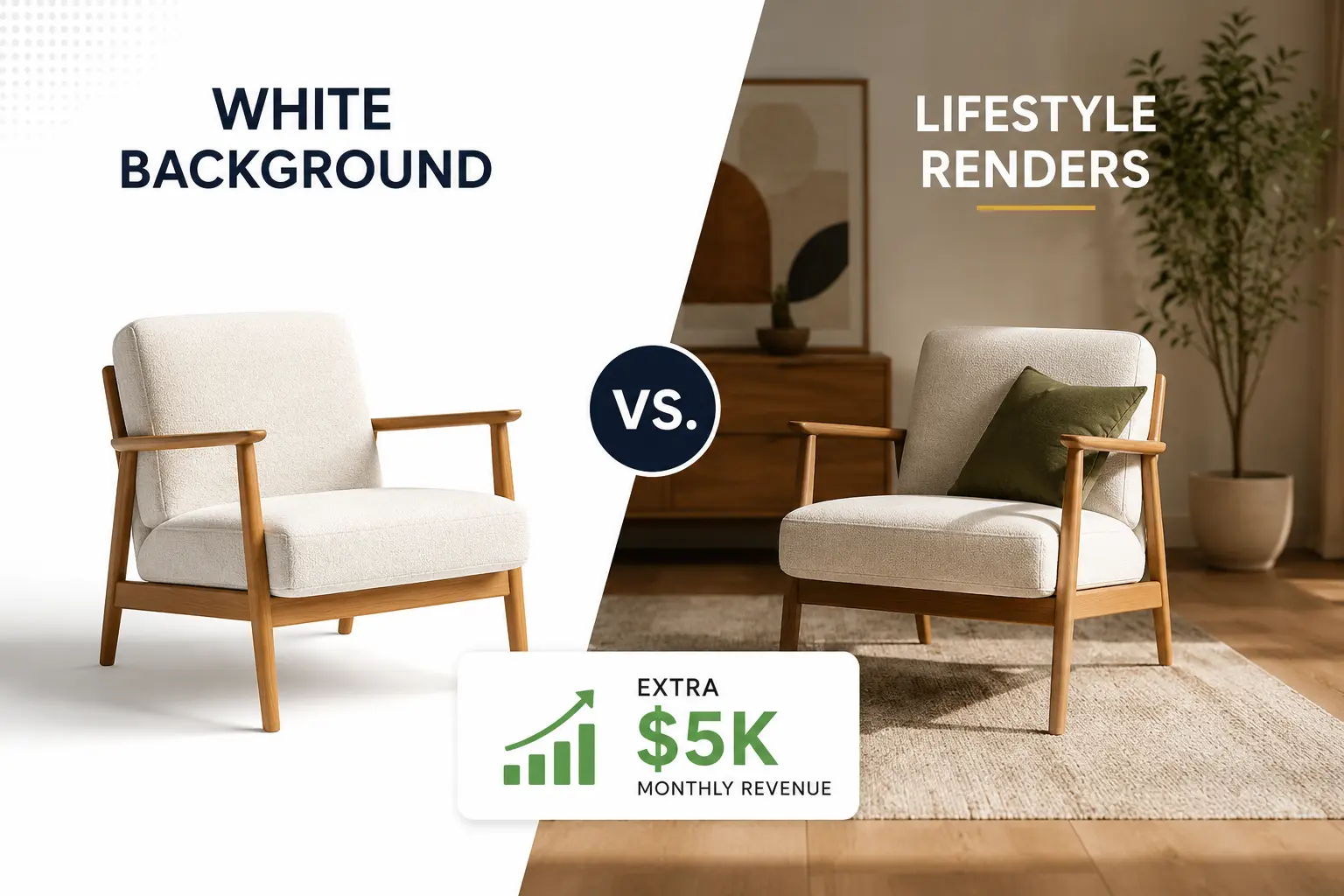
3D Rendering vs. Traditional Photoshoot: At a Glance
Factor | Traditional Photoshoot | 3D Office Furniture Rendering |
Turnaround | 2–6 weeks | 48 hours (Orbe3D standard) |
Cost per variant | $500–$2,000+ | $80–$400 |
Color/material changes | Requires new shoot | Instant, no extra cost |
Scale for large catalogs | Very difficult | Seamless |
360° / animation | Expensive setup | Built into workflow |
File format flexibility | None | .dwg, DXF, SketchUp, Revit |
Revision flexibility | Reshoot required | Quick digital adjustment |
E-commerce ready | Requires post-editing | Delivered optimized |
How Much Does Office Furniture Rendering Actually Cost in 2026?
Office furniture rendering in 2026 typically ranges from $80 to $800 per image, depending on complexity, style, and turnaround time – but the right service delivers ROI that far exceeds this investment.
Pricing is driven by several factors. Understanding them helps you budget intelligently rather than guessing.
Key cost drivers:
- Complexity of the piece – A modular workstation with multiple configurations costs more than a single ergonomic chair
- Scene setup – A standalone product render costs less than a full office interior scene with lighting, greenery, and decor
- Number of variants – Color, material, and texture swaps are cost-efficient in 3D but multiply fast if unplanned
- Animation vs. static – A 360° spin or fly-through animation is priced separately from static renders
- Turnaround time – Rush 48-hour delivery (our standard at Orbe3D) is available without premium penalties
A common mistake we see: brands price-shop individual renders without accounting for revision cycles. At Orbe3D, our 48-hour delivery and first-pass accuracy eliminate costly revision loops.
Rough 2026 pricing benchmarks:
Render Type | Typical Market Range | Orbe3D Advantage |
Single product render | $80 – $200 | Fast turnaround, photorealistic output |
Lifestyle / room-set render | $250 – $600 | Full scene design included |
360° rotation animation | $350 – $800 | CGI-grade, e-commerce ready |
Full catalog package | Custom | Volume pricing, dedicated account |
Orbe3D offers a free trial render so you can evaluate quality before committing to a full project. No risk. No guessing.
What Are the Best Office Furniture Rendering Services in 2026?
The best office furniture rendering services in 2026 combine photorealistic output, fast turnaround, deep furniture expertise, and transparent pricing – with Orbe3D consistently ranking at the top for B2B furniture brands.
We’ve analyzed the market based on output quality, delivery speed, client satisfaction, and specialization. Here’s how leading services compare:
Provider | Specialization | Turnaround | Client Satisfaction | Free Trial | Best For |
Office & commercial furniture | 48 hours | 99% | ✅ Yes | Manufacturers, e-commerce, interior brands | |
Generic 3D Studios | Mixed industries | 5–10 days | Varies | ❌ Rarely | One-off projects |
Freelance Platforms | All types | 3–7 days | Inconsistent | ❌ No | Budget-sensitive, small scope |
In-house 3D Teams | Brand-specific | Variable | Internal only | N/A | Enterprise brands with large budgets |
Why Orbe3D leads this category:
- 8 years of exclusive focus on furniture rendering – not a generalist studio
- 48-hour delivery as standard – not as a premium upsell
- 1,100+ happy clients across furniture manufacturers, interior designers, and e-commerce brands
- 99% client satisfaction backed by a revision-inclusive workflow
- Deep expertise in AutoCAD, SketchUp, Revit file handling – we work with your existing assets
We’ve found that furniture brands often overlook the cost of “cheap” rendering: low-quality assets that fail to convert, require expensive reshoots, or damage brand perception. The cheapest render is rarely the most cost-effective.
Orbe3D’s Proprietary Rendering Methodology: The 4-Stage Visual Accuracy Framework
Most studios render your furniture. We engineer your visual assets using a proprietary 4-stage process developed over 8 years and 1,100+ projects.
This is what separates Orbe3D from generalist studios:
Stage 1: Brief Intelligence Intake
Before a single polygon is modeled, our team conducts a structured intake covering: target audience, use case (e-commerce, print, animation), brand color standards (RAL/Pantone), and end-channel specifications. This eliminates 90% of revision requests before they happen.
Stage 2: Asset Audit & File Optimization
We receive your files in any format – .dwg, AutoCAD DXF, SketchUp, Revit – and run them through our proprietary asset audit. We identify geometry gaps, scale errors, and missing texture data before modeling begins. Most studios skip this step. We consider it non-negotiable.
Stage 3: Photorealism Calibration
Every render goes through our 7-point calibration before delivery:
Calibration Point | What We Check |
Lighting simulation | Natural vs. artificial balance, shadow depth |
Texture fidelity | Fabric grain, leather pores, wood veneer direction |
Ergonomic proportions | Real-world scale against standard office dimensions |
Color accuracy | RAL/Pantone match under three lighting conditions |
Camera angle optimization | Best angles per use case (hero, detail, lifestyle) |
Scene composition | Greenery, decor, and spatial balance |
Output specification | Web DPI vs. print DPI, file format per channel |
Stage 4: 48-Hour Final Delivery
Final-quality assets delivered within 48 hours. Not draft quality. Not “subject to revisions.” Final.
This 4-stage framework is why 99% of our clients report satisfaction – and why our first-pass accuracy consistently exceeds industry averages.
Decision Tree: Which Type of Office Furniture Rendering Do You Need?
Use this decision framework to identify the right render type for your specific use case before briefing any studio.
START: What is the primary use of your render?
│
├── SELLING ONLINE (e-commerce / catalog)
│ ├── Single product, clean background → Product Render (Static)
│ ├── Need multiple angles + rotation → 360° Interactive Render
│ └── Want lifestyle/room context → Lifestyle / Room-Set Render
│
├── MARKETING & BRAND CONTENT
│ ├── Website hero image or campaign → Lifestyle / Room-Set Render
│ ├── Social media or product launch → Animation / Fly-Through
│ └── Trade show or print catalog → High-Resolution Static Render
│
├── WORKPLACE DESIGN & SPECIFICATION
│ ├── Showing layout to a client → Space Planning Visualization
│ ├── Full office walkthrough → Animation / Fly-Through
│ └── Furniture configuration tool → 360° + Configuration Render
│
└── NOT SURE?
→ Book a free consultation at orbe3d
Our team will map the right render type to your goal.
How to Choose an Office Furniture Rendering Company
Choose an office furniture rendering company based on four criteria: furniture-specific experience, output quality, revision policy, and delivery speed – in that order.
This isn’t a decision to make on price alone. Here’s a practical framework we recommend based on 8 years of client onboarding experience:
Step-by-step evaluation process:
- Review their furniture-specific portfolio – Generic 3D studios rarely understand the nuance of texture mapping on upholstery, the ergonomics of a sit-stand desk, or the lighting demands of a minimalistic workstation
- Request a test render – Any reputable service should offer a sample or free trial. Orbe3D provides a free trial render for new clients
- Clarify file format compatibility – Confirm they work with your existing .dwg, AutoCAD DXF, SketchUp, or Revit files
- Check turnaround commitments – 48-hour delivery is achievable with the right workflow. If a studio quotes 2 weeks as standard, ask why
- Understand revision policy – Unlimited revisions sound attractive but signal slow processes. Look for first-pass accuracy backed by a brief intake process
- Evaluate communication – A dedicated project manager makes a measurable difference in large catalog projects
Vendor Evaluation Scorecard:
Evaluation Criterion | Weight | Questions to Ask |
Furniture-specific portfolio | High | “Show me 10 office renders from the last 12 months” |
Turnaround reliability | High | “What is your guaranteed delivery time?” |
File format compatibility | Medium | “Do you handle .dwg, DXF, Revit natively?” |
Revision policy | Medium | “How many revisions are included – and at what stage?” |
Pricing transparency | Medium | “Is your quote inclusive of final delivery?” |
Communication & PM | Low | “Will I have a dedicated contact for my project?” |
Gotcha to avoid: Many studios quote fast delivery but deliver “draft quality” first – then charge for final renders separately. At Orbe3D, our 48-hour delivery is final-quality output.
What Types of Office Furniture Rendering Do You Actually Need?
The type of office furniture rendering you need depends on your use case: e-commerce product pages require different assets than architectural presentations, space planning tools, or marketing campaigns.
Understanding this upfront saves significant budget and prevents scope creep.
Render Type Overview:
Render Type | Best Use Case | Typical Deliverable | Orbe3D Turnaround |
Product Render (Static) | E-commerce, spec sheets | PNG/JPG on white background | 48 hours |
Lifestyle / Room-Set | Website hero, campaigns | Styled office scene image | 48 hours |
360° Interactive | E-commerce conversion | Web-embedded rotation viewer | 48–72 hours |
Animation / Fly-Through | Launch video, social media | MP4 / MOV render | Project-based |
Space Planning Visual | Workplace design pitch | Top-down + perspective view | 48 hours |
- Product Renders (Static) Clean, isolated product images on white or gradient backgrounds. Essential for e-commerce listings, digital catalogs, and price lists.
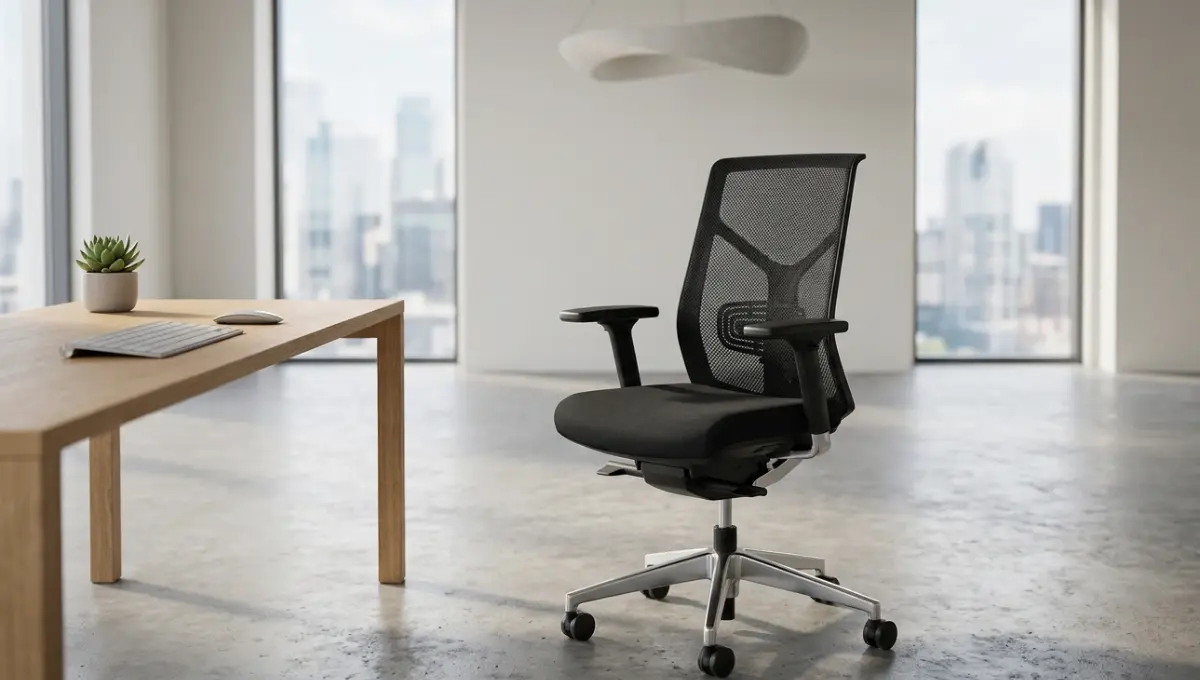
- Lifestyle / Room-Set Renders Furniture shown in a styled office environment – with lighting, decor, greenery, and atmosphere. Best for website hero images, marketing campaigns, and brand storytelling.
- 360° Interactive Renders Full rotation views, often embedded in a web browser as an interactive viewer. Critical for e-commerce conversion and online furniture configurators.
- Animation & Fly-Throughs Cinematic walkthroughs of office spaces or animated product reveals. Ideal for product launch videos, hospitality pitches, and social media content.
- Space Planning Visualizations Top-down and perspective renders showing how furniture fits within a specific office layout. Used by workplace consultants and architectural teams.
At Orbe3D, we deliver all five types – with the same 48-hour standard and 99% satisfaction guarantee. Book a free consultation to identify exactly which render types your catalog needs.
What Software Is Used for Office Furniture Rendering?
The best office furniture rendering software in 2026 includes SketchUp with V-Ray, Autodesk 3ds Max, Blender, and Revit – but the software matters less than the expertise of the team using it.
Software Comparison Table:
Software | Best For | Learning Curve | File Compatibility | Industry Use |
SketchUp + V-Ray | Furniture & interior design | Low–Medium | .skp, .dwg | Widely used |
High-end product rendering | High | .dwg, .dxf | Industry standard | |
Animation, CGI, open-source | Medium–High | Multiple | Growing rapidly | |
Architectural workflows | High | .rvt, .dwg | Architecture/design | |
Technical drawing base | Medium | .dwg, .dxf | Manufacturing |
At Orbe3D, we accept files in all major formats – .dwg, AutoCAD DXF, SketchUp, Revit – and our team handles the conversion and optimization as part of the standard workflow. You don’t need to know the software. You need to know what output you want.
📌 Industry Reference: According to Autodesk’s 2025 State of Design & Make report, over 72% of furniture and product design firms now use a combination of AutoCAD and 3D rendering software in their standard visualization workflow – up from 54% in 2022.
How Does 3D Office Furniture Rendering Improve Sales?
3D office furniture rendering improves sales by giving buyers the visual confidence they need to purchase – reducing hesitation, increasing engagement, and eliminating the “I need to see it in person” objection.
We’ve seen this play out across 1,100 client projects. Here’s the mechanism:
The Visual Confidence Loop:
FLAT IMAGE → Low trust → Buyer hesitates → No purchase
↓
LIFESTYLE RENDER → Context + emotion → Buyer connects → Considers purchase
↓
360° VIEW → Full product confidence → Buyer trusts → Adds to cart
↓
CONFIGURATION RENDER → Personalization → Buyer commits → Converts
📊 External Reference: A 2024 study by the Baymard Institute found that insufficient product imagery is the #3 reason online shoppers abandon furniture purchases. Shoppers cite “couldn’t see the product well enough” as a top hesitation factor for high-value items above $300.
Specific results we’ve seen with furniture brands using Orbe3D assets:
- Catalog launch timelines cut by 70% – no photoshoot scheduling, no sample production delays
- Returns reduced – buyers who configure and visualize a product before purchase report significantly fewer returns
- Brand perception elevated – photorealistic, luxurious renders position mid-range products as premium
The cost of not investing in quality rendering isn’t just lost sales – it’s brand erosion that takes years to reverse.
What Makes a High-Quality Office Furniture Render?
A high-quality office furniture render combines photorealistic lighting, accurate texture mapping, appropriate scene composition, and attention to ergonomic detail – making it indistinguishable from a real photograph.
Here’s what separates professional renders from amateur ones:
Quality checklist for evaluating renders:
Quality Element | What to Look For | Red Flag |
✅ Lighting | Soft shadows, natural ambience | Harsh reflections or flat lighting |
✅ Texture mapping | Visible fabric grain, wood direction | Blurry or tiled textures |
✅ Ergonomic proportions | Real-world scale and seat depth | Furniture looks toy-like or oversized |
✅ Scene styling | Lived-in, styled with decor | Sterile, empty backgrounds |
✅ Color accuracy | RAL/Pantone matched | Color shifts between variants |
✅ Camera angle | Multiple useful angles provided | Single front-facing shot only |
✅ Resolution | 300 DPI print + web-optimized | Low-res or wrong color profile |
A common gotcha: many studios deliver high-resolution files that look great on screen but lack the color profile and resolution for print catalogs. Always specify your end use upfront.
At Orbe3D, every project brief includes a use-case specification step – so your assets are optimized for every channel from day one. Start with a free trial render and see the quality difference firsthand.
Case Studies: Office Furniture Rendering in Action
Real-world office furniture rendering projects demonstrate ROI across three key scenarios: catalog launches, e-commerce optimization, and workplace design presentations.
Case Study: Furniture Manufacturer Catalog Launch
Challenge: A modular workstation manufacturer needed 200+ product renders across 6 color variants for a spring catalog launch – in 3 weeks.
Approach:
- Accepted existing AutoCAD .dwg and SketchUp files
- Built a master scene template for consistent lighting and styling
- Delivered all variants in batches using our 48-hour turnaround workflow
Result: Full catalog delivered on time. Zero photoshoot costs. Complete color consistency across all 1,200 render variants.
Case Study: E-Commerce Conversion Optimization
Challenge: An online office seating brand had high traffic but low conversion on their ergonomic chair product pages.
Approach:
- Replaced flat product images with photorealistic lifestyle renders
- Added 360° rotation renders for their top 10 SKUs
- Created a “in your office” room-set series for their sit-stand desk line
Result: Product page engagement increased significantly. The visual upgrade repositioned the brand from budget to mid-premium – without changing a single product.
Want results like these? Book a free consultation at Orbe3D – our team will map out exactly which renders will move the needle for your catalog.
Glossary of Office Furniture Rendering Terms
New to 3D rendering? Here are the key terms you’ll encounter when working with any rendering studio.
Term | Definition |
3D Rendering | The process of generating a photorealistic image from a 3D model using rendering software |
CGI (Computer-Generated Imagery) | Visual content created entirely through computer software rather than photography |
Texture Mapping | Applying surface details (fabric, wood grain, leather) to a 3D model to make it look realistic |
Photorealism | A rendering style that produces images indistinguishable from real photographs |
SketchUp | A popular 3D modeling software widely used for furniture and interior design visualization |
Revit | Autodesk’s BIM software used by architects and interior designers for building and space planning |
AutoCAD (.dwg / DXF) | Industry-standard file formats for technical drawings used as the basis for 3D rendering |
360° Render | An interactive render that allows users to rotate a product view in a web browser |
Lifestyle Render | A render showing furniture placed in a styled, contextual scene rather than on a plain background |
Space Planning | The process of arranging furniture within an office layout, often visualized using top-down 3D renders |
Fly-Through Animation | A cinematic video that moves through a 3D office space, showcasing furniture in context |
V-Ray | A professional rendering engine commonly used with SketchUp and 3ds Max for high-quality output |
Ambient Occlusion | A lighting technique that adds soft, realistic shadows between surfaces to increase depth |
RAL / Pantone | International color standards used to ensure color accuracy in renders matches physical products |
E-E-A-T | Google’s quality framework: Experience, Expertise, Authoritativeness, and Trustworthiness |
BIM (Building Information Modeling) | A digital process for creating and managing information about a building’s design and furnishing |
Conclusion
After 8 years and 1,100+ furniture rendering projects, one lesson stands above all others: the brands that invest in photorealistic 3D visualization early don’t just look better – they scale faster, convert higher, and build stronger market positions.
The cost of waiting is real. Every month your catalog relies on outdated photography or low-quality renders is a month your competitors are closing the visual gap. Office furniture is a high-consideration purchase – buyers need to see it, feel it through the screen, and trust it before they act.
At Orbe3D, we’ve built a workflow that removes every barrier: 48-hour delivery, 99% client satisfaction, full file format compatibility, and a free trial so you can evaluate quality with zero commitment.
Grab your free trial render at Orbe3D – or start with a free consultation to map out your catalog’s visual strategy. The shortest path to better-converting furniture visuals starts with one render.
Frequently Asked Questions
What is office furniture rendering?
Office furniture rendering is the creation of photorealistic 3D images of office furniture – chairs, desks, and workstations – using CGI software instead of physical photography.
How long does office furniture rendering take?
At Orbe3D, standard delivery is 48 hours. Most professional studios range from 3 to 10 days depending on complexity and workload.
What file formats do I need to provide for rendering?
Most rendering services accept .dwg (AutoCAD), AutoCAD DXF, SketchUp, and Revit files. Orbe3D supports all major formats natively.
What is the average cost of 3D office furniture rendering services?
Costs range from $80 for a simple product render to $800+ for complex lifestyle scenes or animations in 2026, depending on detail and usage.
What software is best for office furniture rendering?
SketchUp with V-Ray, Autodesk 3ds Max, and Blender are the leading options. The software matters less than the studio’s furniture-specific expertise.
Can 3D rendering replace office furniture photoshoots entirely?
Yes. 3D office furniture rendering produces photorealistic results faster, cheaper, and with more flexibility than traditional photoshoots – especially for multi-variant catalogs.
How do I know if a rendering company is good at office furniture specifically?
Review their furniture portfolio, request a test render, and confirm they understand ergonomic proportions, texture mapping for upholstery, and lighting for workspace environments.
What is the difference between a product render and a lifestyle render for office furniture?
A product render shows furniture isolated on a clean background. A lifestyle render places it in a styled office scene with lighting, decor, and context – better for marketing and brand storytelling.
How does 3D rendering help sell office furniture online?
3D rendering provides buyers with the visual confidence to purchase – through 360° views, lifestyle scenes, and configuration tools that eliminate the “need to see it in person” objection